
See where you stand.
Set your project budget and organise estimates and agreed costs. The overview separates money paid, commitments still to pay and unpriced work, so you can see what the forecast includes.
Budg-IT is live
Building or renovating a home involves enough decisions without constantly wondering where the money is going. Budg-IT helps you keep the financial side of your project organised, so you can approach those decisions with a clearer picture.
Add the live web app to your home screen through your browser. You’ll need an internet connection to load and save projects.
The problem
A quote in an email. A payment in your banking app. An extra agreed last week. The numbers can end up scattered while the project keeps moving.
Budg-IT brings those records together. See what you have paid, what is agreed but still to pay, and where estimates or missing prices still need attention. An unpriced job is not a saving. It is a number you still need.
What Budg-IT does
Practical tools to organise your project, from the first estimates to the jobs still to finish.
Set your project budget and organise estimates and agreed costs. The overview separates money paid, commitments still to pay and unpriced work, so you can see what the forecast includes.
Keep quotes together and use the comparison view when weighing up your options. Give the figures some context before deciding who gets the job.
Record payments and additional costs as the project develops. Keep the agreed work and the extras visible instead of relying on memory.
Plan from available cash, expected incoming funds and dated payment reminders. See when money may be needed; undated commitments are not included in the cashflow view.
Save project documents and record snags that need attention. Keep your original files too, and download or export your records when you need them.
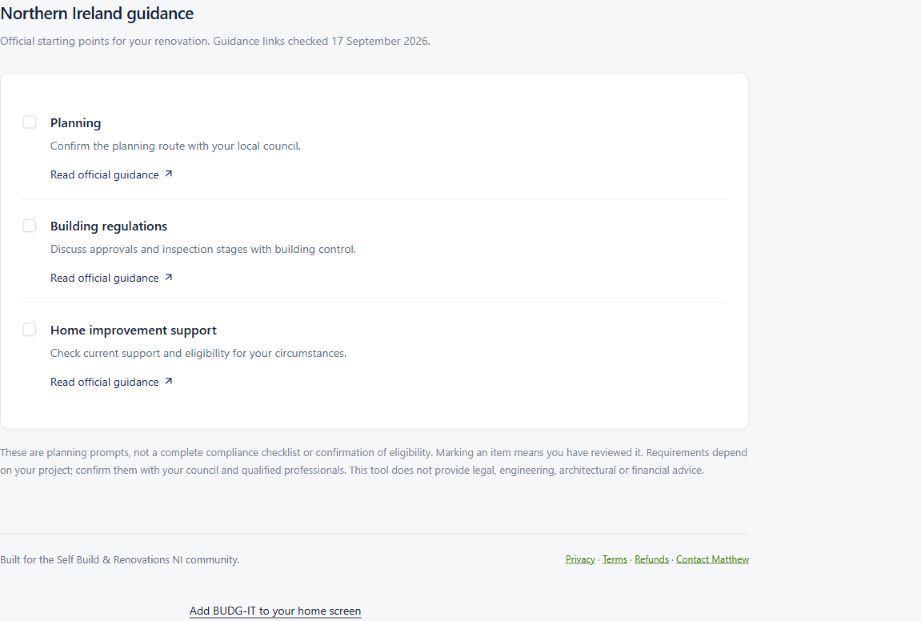
Review project stages, add dated tasks and payment reminders, and download calendar reminders. Local guidance links provide official starting points for your selected jurisdiction.
Who it is for
Budg-IT is for people managing a self-build, renovation or extension who want their project finances and records in one place.
The live planner supports Northern Ireland, the Republic of Ireland, England, Scotland and Wales. Your selected jurisdiction determines the currency label and local guidance. Changing it does not convert the amounts you have entered.
It is an organising tool, not a replacement for your builder, architect, surveyor or financial adviser. Check prices, requirements and decisions with the relevant people.
Why I created it
I’m Matthew Ralston, founder of RCM Impact Marketing and the person behind SelfBuild & Renovations NI. Budg-IT brings together my involvement in that community and my interest in building useful digital tools.
The aim is straightforward: give people managing a build or renovation a clearer way to organise the financial side. It is Matthew’s own product, separate from RCM’s client work.
Meet the communities ↗A look inside
A look at the local guidance and home-screen installation in the live app. Screenshots captured on 25 September 2026.

Getting started
Use your phone or tablet to open the Budg-IT installation page. It explains how to add the live web app.
Android: open budg-itapp.com in Chrome, tap the three-dot menu, then Add to Home screen or Install app, and confirm.
iPhone or iPad: open budg-itapp.com in Safari, tap Share, then Add to Home Screen. Keep Open as Web App on if shown, then tap Add.
Use the Budg-IT icon and sign in as prompted. Use the same email to access your saved projects. Start with the project details and budget, then build up your records as you go.
Already using a preview version? The live app installs separately. Open it and check your saved projects before removing the old preview app. Information entered only in a preview example may not be in your saved account.
A few sensible questions
Yes. The live web app is available at budg-itapp.com. Use the installation page to add it to a supported device’s home screen.
The installation route here is through your browser: Chrome on Android, or Safari on iPhone and iPad. Follow the home-screen instructions rather than looking for an App Store or Google Play listing.
Yes. You need a connection to load and save your projects. Web app improvements arrive when you reopen or refresh it.
Budg-IT has a trial and paid Project Pass access. Check the current Project Pass terms for pricing, trial details and what happens when the trial ends. Adding the icon to your home screen is not the same as buying a pass.
It organises the figures and records you enter. Missing prices remain missing from the forecast, so an apparent amount left over is not a confirmed saving. Get estimates and advice for your actual project.
Use the help section in the app or email selfbuildingni@gmail.com. Keep sensitive financial information and private documents out of general support emails.
Budg-IT is live
Keep the financial side of your self-build
or renovation organised.